
OpenList自定义美化风格代码
前言
效果
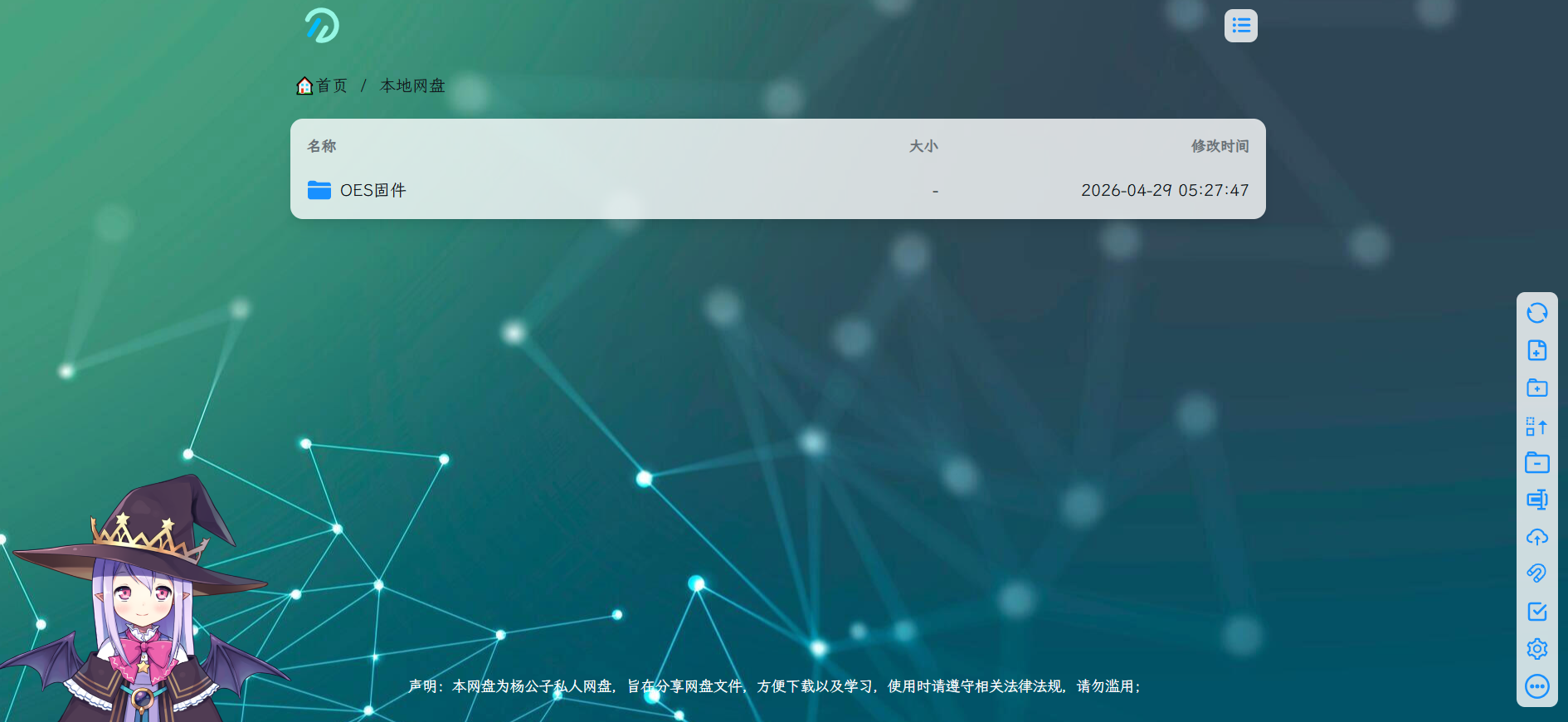
代码备份
自定义头部:
<!-- 引入自定义字体 -->
<link rel="stylesheet" href="https://s4.zstatic.net/ajax/libs/lxgw-wenkai-webfont/1.7.0/lxgwwenkai-regular.min.css">

<style>
    /* 移除原生视频控件 */
    video::-webkit-media-controls {
        display: none;
    }

    /* 设置背景图片样式 */
    body {
        background-repeat: no-repeat;
        background-size: cover;
        background-attachment: fixed;
        background-position: center;
    }

    /* 在此处的url()里修改背景图片地址 */
    /* 加了个深色遮罩,爱护你的眼睛 */
    body.hope-ui-dark {
        background-color: rgb(32, 36, 37);
        background-image: linear-gradient(rgba(32, 36, 37, 0.7), rgba(32, 36, 37, 0.7)), url('https://img.imotao.com/i/2026/04/30/69f2fc6ee8517.jpg');
    }

    /* 在此处的url()里修改背景图片地址 */
    body.hope-ui-light {
        background-image: url('https://img.imotao.com/i/2026/04/30/69f2fc6ee8517.jpg');
    }

    /* 统一站点公告的样式 */
    .hope-ui-light .hope-c-PJLV-ikJQsXT-css {
        background: rgba(255, 255, 255, 0.8) !important;
        backdrop-filter: blur(0) !important;
    }

    .hope-ui-dark .hope-c-PJLV-ikJQsXT-css {
        background: rgb(32, 36, 37) !important;
        backdrop-filter: blur(0) !important;
    }

    /* 自定义字体 */
    * {
        font-family: "LXGW WenKai", sans-serif;
    }
</style>

<!-- 看板娘 -->
<script src="https://l2d.mmoe.work/dist/autoload.js" async></script>

<script
    src="https://s4.zstatic.net/ajax/libs/js-polyfills/0.1.43/polyfill.min.js?features=String.prototype.replaceAll"></script>
自定义内容:
<!-- 修正部分区域的透明 -->
<style>
    .hope-ui-light,
    .hope-ui-dark {
        --hope-colors-background: transparent;
    }
</style>

<script type="module">
    // v7

    // 提供用来监听代码控制的 url 变化的事件
    (() => {
        const wrapHistoryMethod = (type) => {
            const orig = history[type];
            return function (...args) {
                const rv = orig.apply(this, args);
                const event = new CustomEvent(type, { detail: args });
                window.dispatchEvent(event);
                return rv;
            };
        };
        history.pushState = wrapHistoryMethod('pushState');
        history.replaceState = wrapHistoryMethod('replaceState');
    })();

    class Beautifier {
        /**
            * Beautifier 类用于美化页面背景色
            *
            * 其提供了3个方法:
            * - observe: 开始监听页面变化并美化背景色
            * - disconnect: 停止监听页面变化
            * - undo: 恢复页面背景色到默认状态
            *
            * 可以通过window.beautifier访问实例对象
            *
         */
        static ignoredSelectors = [
        '.hope-tooltip', // 提示小标签及其装饰
        '.hope-tooltip__arrow',
        '.hope-checkbox__control',// 复选框
        '.hope-modal__overlay', // 模态框遮罩
        '.hope-drawer__overlay', // 抽屉遮罩
        '.hope-select__option', // 下拉选项
        '.monaco-editor, .monaco-editor *', // 代码编辑器
        '.art-video-player, .art-video-player *', // 视频播放器
        'button:not(.hope-menu__trigger)', // 除目录外按钮
        'svg' // SVG 图标
    ];

        static getSelector(mainSelector) {
            return `${mainSelector} :not(${Beautifier.ignoredSelectors.join('):not(')})`;
        }

        static lightSelector = Beautifier.getSelector('.hope-ui-light');
        static darkSelector = Beautifier.getSelector('.hope-ui-dark');

        static lightBgColor = 'rgba(255, 255, 255, 0.8)';
        static darkBgColor = 'rgb(32, 36, 37)';

        static specificPrefix = 'rgba(132, 133, 141,';

        constructor() {
            this.observer = null;
        }

        /**
         * @param {'light'|'dark'} theme
         */
        #rewriteStyle(theme) {
            let selector = theme === 'light' ? Beautifier.lightSelector : Beautifier.darkSelector;
            let bgColor = theme === 'light' ? Beautifier.lightBgColor : Beautifier.darkBgColor;

            document.querySelectorAll(selector).forEach(element => {
                const computedStyle = getComputedStyle(element);

                if (computedStyle.backgroundColor !== 'rgba(0, 0, 0, 0)' &&
                    !computedStyle.backgroundColor.startsWith(Beautifier.specificPrefix)) {
                    element.style.backgroundColor = bgColor;

                    element.setAttribute('data-beautified', 'true');
                }
            });
        }

        #beautify() {
            if (!location.pathname.startsWith('/@manage') && !location.pathname.startsWith('/@login')) {
                this.#rewriteStyle('light');
                this.#rewriteStyle('dark');
            }
        }

        observe() {
            this.observer = new MutationObserver(this.#beautify.bind(this));
            this.observer.observe(document.body, {
                childList: true,
                subtree: true
            });

            this.#beautify();
        }

        disconnect() {
            if (this.observer) {
                this.observer.disconnect();
            }
        }

        undo() {
            this.disconnect();

            document.body.querySelectorAll('[data-beautified]').forEach(element => {
                element.style.backgroundColor = '';

                element.removeAttribute('data-beautified');
            });
        }
    }

    const beautifier = new Beautifier();
    window.beautifier = beautifier;

    beautifier.observe();

    // 一个愚蠢到有点无敌的修复机制,不过工作良好
    (() => {
        function fixLogin(pathname) {
            if (pathname.startsWith('/@login')) {
                beautifier.undo();
            }
            else {
                beautifier.disconnect();
                beautifier.observe();
            }
        }

        ['popstate', 'pushState', 'replaceState'].forEach(eventType => {
            addEventListener(eventType, () => {
                fixLogin(location.pathname);
            });
        });
    })();
</script>

<script src="https://cdn.jsdelivr.net/npm/sweetalert2@11"></script>

<style>
    footer,
    [class*="footer"],
    [class*="hope-footer"] {
        display: none !important;
    }

    .copyright {
        text-align: center;
        margin-top: 20px;
        font-size: 14px;
        color: #666;
        display: none;
        padding: 10px;
    }

    @media (max-width: 768px) {
        .copyright {
            font-size: 12px;
        }
    }
</style>

<div class="copyright">
    <div class="state">
        <p>声明:本网盘为杨公子私人网盘,旨在分享网盘文件,方便下载以及学习,使用时请遵守相关法律法规,请勿滥用;</p>
    </div>
</div>


<script src="https://cdn.jsdelivr.net/npm/sweetalert2@11"></script>

<style>
    footer,
    [class*="footer"],
    [class*="hope-footer"] {
        display: none !important;
    }

    .copyright {
        text-align: center;
        margin-top: 20px;
        font-size: 14px;
        color: #666;
        display: none;
        padding: 10px;
    }

    /* 声明文字改为白色 */
    .copyright .state p {
        color: #ffffff;
    }

    @media (max-width: 768px) {
        .copyright {
            font-size: 12px;
        }
    }
</style>

<div class="copyright">
    <div class="state">
        <p>声明:本网盘为杨公子私人网盘,旨在分享网盘文件,方便下载以及学习,使用时请遵守相关法律法规,请勿滥用;</p>
    </div>
</div>

<script>
    window.addEventListener('load', function () {
        // 检查是否已显示过公告(可选)
        const hasShown = localStorage.getItem('announcementShown');

        if (!hasShown && typeof Swal !== 'undefined') {
            Swal.fire({
                title: "❤️公告❤️",
                html: "本网盘资源不定期更新,可关注我的博客<br><br>🌟https://oes.777171.xyz🌟",
                icon: "success",
                confirmButtonText: "进入网盘",
                backdrop: true,
                allowOutsideClick: false
            }).then(() => {
                // 用户点击确认后显示版权
                const copyrightDiv = document.querySelector('.copyright');
                if (copyrightDiv) {
                    copyrightDiv.style.display = 'block';
                }
                // 记录已显示(可选)
                localStorage.setItem('announcementShown', 'true');
            });
        } else if (hasShown) {
            // 如果已经显示过,直接显示版权
            const copyrightDiv = document.querySelector('.copyright');
            if (copyrightDiv) {
                copyrightDiv.style.display = 'block';
            }
        } else {
            // SweetAlert2 未加载的降级方案
            const copyrightDiv = document.querySelector('.copyright');
            if (copyrightDiv) {
                copyrightDiv.style.display = 'block';
            }
            console.warn('SweetAlert2 未加载,直接显示版权');
        }
    });
</script>
自定义鼠标:
<!--鼠标点击出随机颜色的爱心-->
<!DOCTYPE html>
<html lang="en">
<head>
    <meta charset="UTF-8">
    <meta name="viewport" content="width=device-width, initial-scale=1.0">
    <title>Document</title>
</head>

<body>
    <!-- 网页鼠标点击特效(爱心) -->
    <script type="text/javascript">
         ! function (e, t, a) {
            function r() {
                for (var e = 0; e < s.length; e++) s[e].alpha <= 0 ? (t.body.removeChild(s[e].el), s.splice(e, 1)) : (s[
                        e].y--, s[e].scale += .004, s[e].alpha -= .013, s[e].el.style.cssText = "left:" + s[e].x +
                    "px;top:" + s[e].y + "px;opacity:" + s[e].alpha + ";transform:scale(" + s[e].scale + "," + s[e]
                    .scale + ") rotate(45deg);background:" + s[e].color + ";z-index:99999");
                requestAnimationFrame(r)
            }
            function n() {
                var t = "function" == typeof e.onclick && e.onclick;
                e.onclick = function (e) {
                    t && t(), o(e)
                }
            }

            function o(e) {
                var a = t.createElement("div");
                a.className = "heart", s.push({
                    el: a,
                    x: e.clientX - 5,
                    y: e.clientY - 5,
                    scale: 1,
                    alpha: 1,
                    color: c()
                }), t.body.appendChild(a)
            }

            function i(e) {
                var a = t.createElement("style");
                a.type = "text/css";
                try {
                    a.appendChild(t.createTextNode(e))
                } catch (t) {
                    a.styleSheet.cssText = e
                }
                t.getElementsByTagName("head")[0].appendChild(a)
            }

            function c() {
                return "rgb(" + ~~(255 * Math.random()) + "," + ~~(255 * Math.random()) + "," + ~~(255 * Math
                    .random()) + ")"
            }
            var s = [];
            e.requestAnimationFrame = e.requestAnimationFrame || e.webkitRequestAnimationFrame || e
                .mozRequestAnimationFrame || e.oRequestAnimationFrame || e.msRequestAnimationFrame || function (e) {
                    setTimeout(e, 1e3 / 60)
                }, i(
                    ".heart{width: 10px;height: 10px;position: fixed;background: #f00;transform: rotate(45deg);-webkit-transform: rotate(45deg);-moz-transform: rotate(45deg);}.heart:after,.heart:before{content: '';width: inherit;height: inherit;background: inherit;border-radius: 50%;-webkit-border-radius: 50%;-moz-border-radius: 50%;position: fixed;}.heart:after{top: -5px;}.heart:before{left: -5px;}"
                ), n(), r()
        }(window, document);
    </script>